Industrial Vision Camera
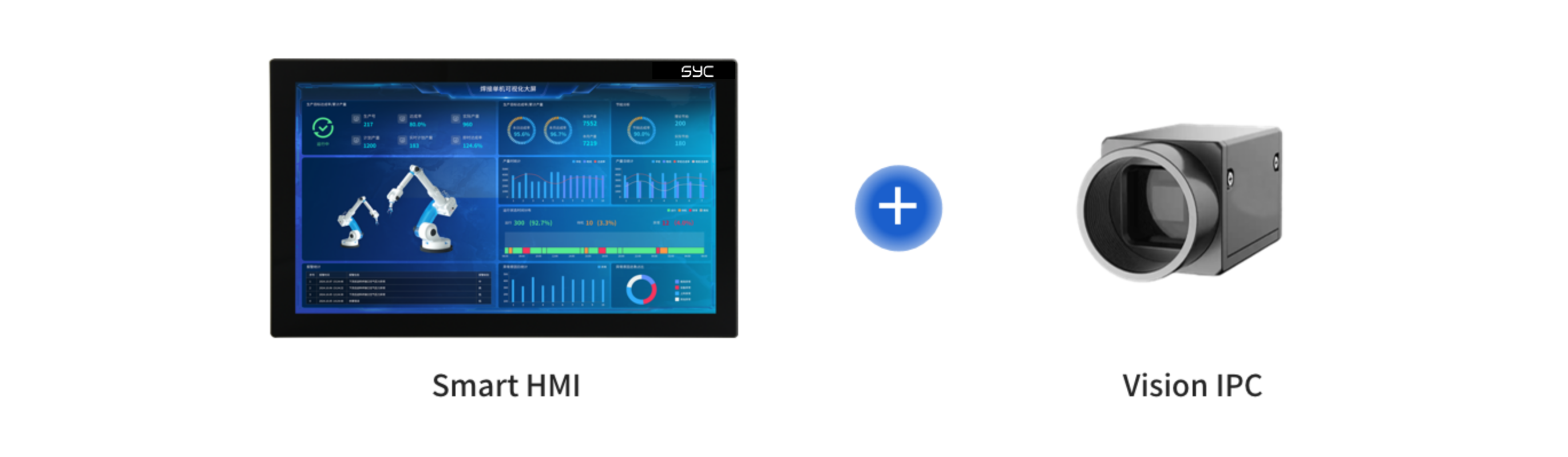
The Smart HMI can be equipped with industrial cameras, integrating high-resolution imaging technology and advanced intelligent algorithms to achieve precise recognition of micron-level defects on product surfaces, such as fine scratches, indentations, foreign object adhesion, stains, and material defects. The system possesses millisecond-level response capabilities and can complete online real-time judgment under high-speed operation conditions of equipment/production lines, meeting dynamic inspection needs under complex working conditions.
Through seamless integration with professional vision software, inspection images and results are transmitted back to the Smart HMI in real-time and linked with production process data, building a data closed-loop of "Inspection—Feedback—Optimization" to assist in dynamic adjustment of process parameters and process improvement. This not only significantly improves quality inspection efficiency and consistency, reducing manual dependence and misjudgment rates, but also promotes the upgrade of quality control from "passive interception" to "active prevention", comprehensively supporting efficient, high-quality, and highly flexible production in intelligent manufacturing scenarios.
The Smart HMI provides a variety of flexible and reliable integration methods, allowing customers to choose based on the actual deployment environment and system architecture.
Shallow Integration (Recommended for Scenarios with Existing Independent Vision Industrial PCs)
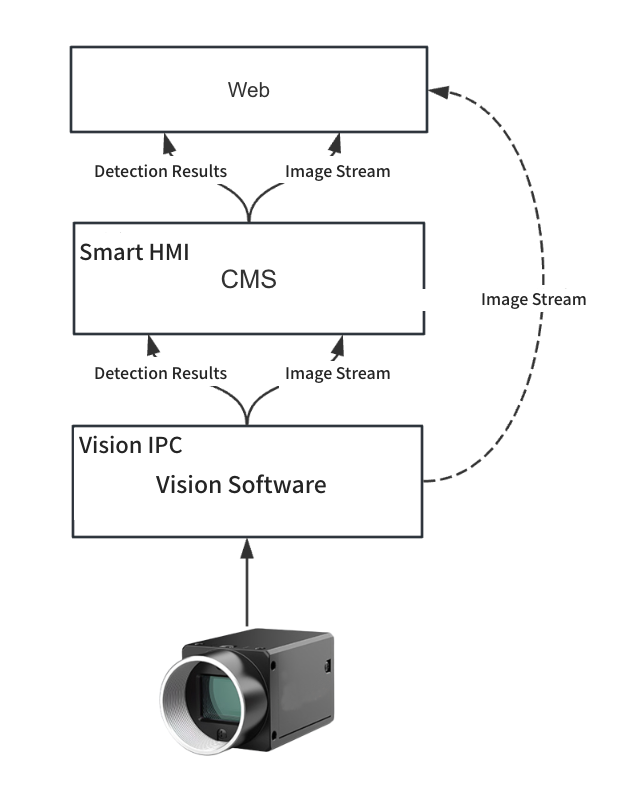
Working Principle: The Smart HMI connects to the vision industrial PC via a network cable, and connects to the vision software system through agreed protocols or interfaces. The industrial camera is occupied by the vision software, and the CMS cannot directly acquire the image stream through the industrial camera, requiring the vision software to provide the image stream and inspection results.
Features:
- Vision software acts as the provider of image streams and inspection results
- CMS obtains inspection results via HTTP interface
- Image streams can be directly accessed via Web-friendly protocols such as HLS and MPEG-DASH
Applicable Scenarios:
- Vision software is running stably and there is no desire to change the existing system architecture
- Industrial camera resources are occupied by vision software, and CMS cannot access the camera directly
- Need to achieve quick system integration and reduce development costs
Advantages:
- Minimal changes to the existing vision system
- Simple deployment, suitable for quick launch
Deep Integration (Recommended for Integrated Hardware and Software Deployment Scenarios)
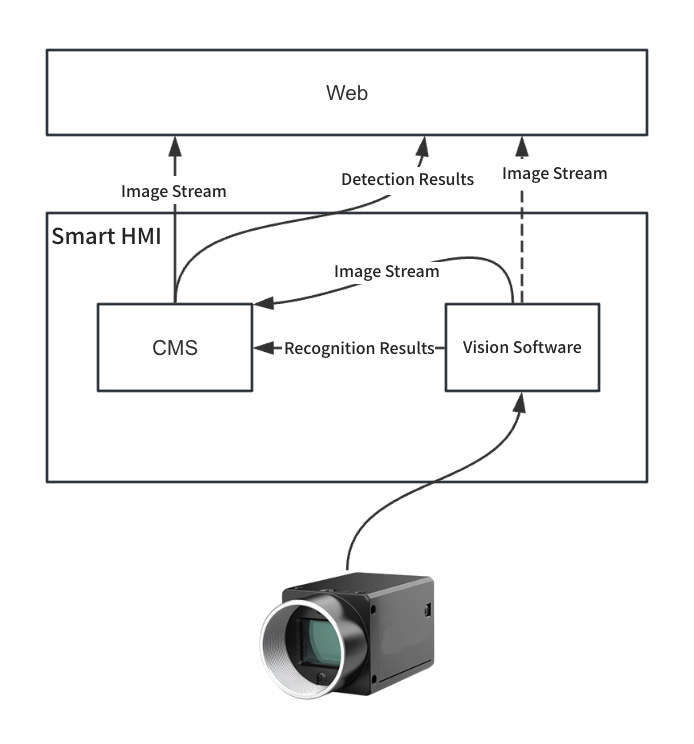
Working Principle: CMS and vision software are installed in the Smart HMI simultaneously. CMS connects to the vision software system through agreed protocols or interfaces. Deep integration is divided into two cases:
1.Vision Software Occupies Camera (Similar to Shallow Integration)
-
CMS indirectly obtains image streams and inspection results through vision software;
-
Suitable for scenarios where vision algorithms have high requirements for image continuity.
2.CMS Occupies Camera (New Mode)
Features:
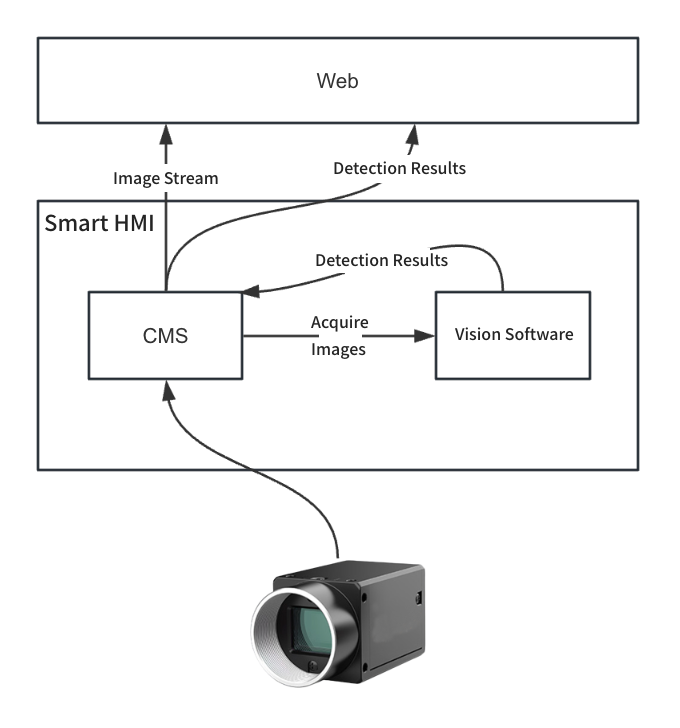
- Industrial camera is directly occupied by CMS to acquire real-time image streams
- CMS can directly meet the needs of displaying live views on the Web end
- Vision software obtains images from CMS for inspection and returns results
Workflow:
-
CMS occupies industrial camera and acquires real-time image stream
-
Vision software requests images via CMS interface
-
Vision software performs inspection and returns results to CMS
-
CMS displays inspection results and real-time images
Advantages:
- Unified management of image streams and inspection results
- Reduces data transmission and conversion links between systems
- Improves system response speed and stability
- Facilitates subsequent functional expansion and system maintenance
Applicable Scenarios:
- Need CMS to directly control industrial camera resources
- Vision software does not need independent image streams
- Desire to achieve high system integration and simplify architecture
- Scenarios with high requirements for system response speed and data consistency
3. Integration Method Selection Suggestion
| Integration Method | Applicable Scenarios | Advantages | Limitations |
|---|---|---|---|
| Shallow Integration | Existing vision system is stable, don't want to change architecture significantly | Fast integration speed, minimal impact on existing system | Data interaction between vision software and CMS is relatively complex |
| Deep Integration (Vision Software Occupies Camera) | Similar to shallow integration, but requires adjustment of vision software | Consistent with shallow integration | No essential difference from shallow integration |
| Deep Integration (CMS Occupies Camera) | Need unified management of camera resources, higher system requirements | Unified management, fast response, good extensibility | Requires adjustment of vision software workflow |